
Address autocomplete can be a very useful feature. Sure, most of us know our own address, but if we have something delivered elsewhere or order a gift for someone, it can help a lot (especially with city districts and ZIP codes). When googling, you’ll of course find some plugins for this, but they use the Google Places API.
I tried to find out whether we could somehow use “our” Seznam Maps, which after all handle address points in the Czech Republic better. Seznam offers many examples, and among them an autocomplete. With the help of Seznam’s example code and this discussion, I managed to put together working code that suggests streets and, once you enter one including the house number, pre-fills the city and ZIP code. Among other things, the correct ZIP code also affects the shipping zones (if we have them set up).
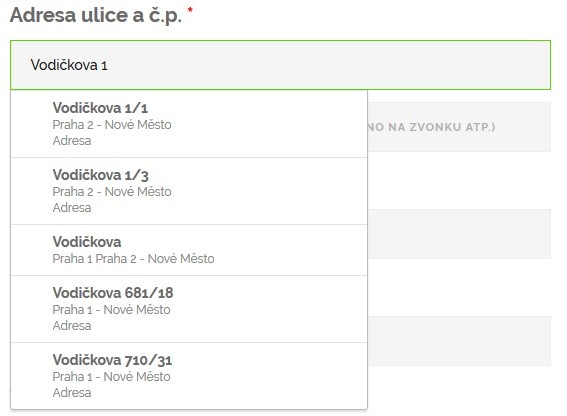
Into functions.php in your child theme we write this code
add_action('wp_head', 'lh_seznam_naseptavac_scripts');
function lh_seznam_naseptavac_scripts() {
    if (is_checkout()) {
        ?>
        <script type="text/javascript" src="https://api.mapy.cz/loader.js"></script>
        <script type="text/javascript">Loader.load(null, {suggest: true});</script>
        <?php
    }
}
add_action('wp_footer', 'lh_seznam_naseptavac');
function lh_seznam_naseptavac() {
    if (is_checkout()) {
        wp_enqueue_script(
                'lh-seznam-naseptavac',
                get_stylesheet_directory_uri() . '/seznam.js',
                array('jquery')
        );
    }
}
The code does nothing more than load the necessary JavaScript. At the start of each function there’s an is_checkout() condition that ensures we only load the scripts on the checkout page.
The important file is seznam.js, which actually contains everything related to autocompletion and pre-filling. As I mentioned, I built on code by Roman Makudera from the discussion I link to above. Many thanks for that. Below is a description of some of the important parts of the code
let suggest = new SMap.Suggest(document.querySelector("#billing_address_1"), {
    factory: (data, pos) => new MyItem(data, pos),
    provider: new MyProvider()
});
This creates the autocomplete object whose input field is billing_address_1. That is, the WooCommerce checkout field for the billing address. Later in the code I create one more autocomplete for shipping_address_1 (i.e. the shipping address)
suggest.getProvider().updateParams(params => {
    params.type = "street|address";
    params.category = "address_cz, area_cz";
});
This part, in turn, tells it that we want to suggest only streets and specific addresses (type = “street|address”) in the Czech Republic (category = “address_cz, area_cz”).
suggest.addListener("suggest", suggestData => {
    data = suggestData.data.origData;
    document.getElementById("billing_city").value = data.quarter;
    document.getElementById("billing_postcode").value = data.zipCode;
    jQuery('body').trigger('update_checkout');
});
In this part we finally fill in the city and ZIP code based on our selection in the autocomplete. Similarly then for shipping_city and shipping_postcode.
The seznam.js file will be in the same directory as functions.php. Now everything should work:)