
Recently I was working on changing the default product sorting on an e-shop. The new default sorting was to be by price, from lowest. The sorting is changed here: Appearance – Customize – WooCommerce – Product Catalog. In my case I chose Sort by price (ascending) and that was it?
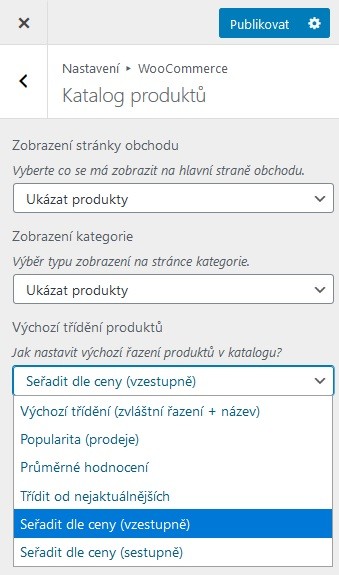
The products did start sorting by price from lowest, but some products that are currently unavailable popped up too. Fortunately, these products can be hidden very easily. In the WooCommerce – Settings – Products – Inventory section there’s the Hide out of stock items from the catalog option.

But what if you don’t want to hide these products, only push them to the end of the list? So that they don’t distract the customer on the first pages, but are still available as a teaser that you carry something like that. In this case I had to reach into the code. Into the functions.php file in your active child theme, write the following code.
The code modifies the query on the products table and sets the primary sorting by stock status (in/out of stock) and the secondary by price from lowest. One more thing – careful! For it to work, you have to switch the product sorting to Default sorting (custom ordering + name) (see the first image).