
The Toggle module is well suited for Frequently Asked Questions (FAQ) sections. Recently I was building one such section, and a piece of feedback came back to me that the clickable area is small and that to expand/collapse this area you have to aim carefully.
So I started looking into how it really is and how it works. The whole toggle is built as a DIV element containing text in an H5 tag, and only this relatively small area is clickable. On top of that, once you expand the toggle, you have to collapse it again by clicking the title area.
Custom JavaScript + CSS
The whole modification is done with custom JavaScript that will handle catching the click event on the module and the expand/collapse animation. With CSS we then change the mouse cursor so the user knows where they can click (we change the arrow to a hand).
But first we’ll tag the module with a CSS class. We click the module settings and choose Advanced – CSS ID & Classes. We’ll name the class, for example, toggle_informace.
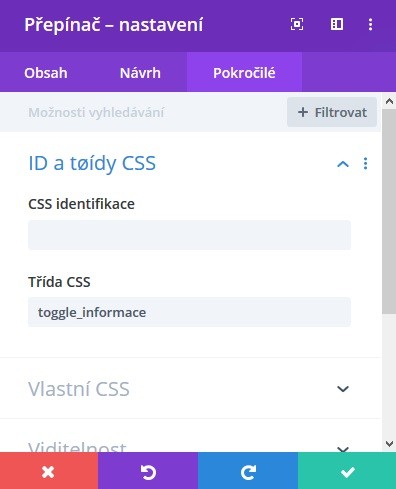
Then we move to the Divi settings. We click Divi – Theme Options – Integration and insert the following code into the body section.
<script type="text/javascript">
(function($) {
	 $(".toggle_informace").on('click', function(event){
		 event.stopPropagation();
		 $(this).find('div').slideToggle(800, function() {
                 if($(this).is(":visible")){
			 $(this).parent().removeClass('et_pb_toggle_close');
			 $(this).parent().addClass('et_pb_toggle_open');
		 }else{
			 $(this).parent().removeClass('et_pb_toggle_open');
			 $(this).parent().addClass('et_pb_toggle_close');
		 }
         });
	 });
})(jQuery);
</script>
With this code we actually override the original behavior and extend the clickable area to our entire DIV toggle_informace. We can adjust the animation speed by changing the number (animation duration in milliseconds) here:
$(this).find('div').slideToggle(800, function() {Now we’ll also add CSS so the user knows where they can click. Anywhere we enter custom CSS (for example into Divi – Theme Options – General – Custom CSS (all the way at the bottom)) we insert this code:
.toggle_informace{
	cursor: pointer;
}
And that’s it. We can adjust the other things further using the Divi Builder.