
Note from 4 September 2026: This post was published in June 2019 and describes how Curve worked back then. The terms, plans and fees have changed since – check curve.com for current information. I am keeping the text online as a period note and no longer updating it.
I love new tech gadgets, novelties and clever tricks, so this new payment card didn’t escape my attention either. This card can merge all your existing cards into one, sort out your purchases, save on fees, and all while keeping everything fully under your control. On top of that, it’s completely free.
How do you get the card?
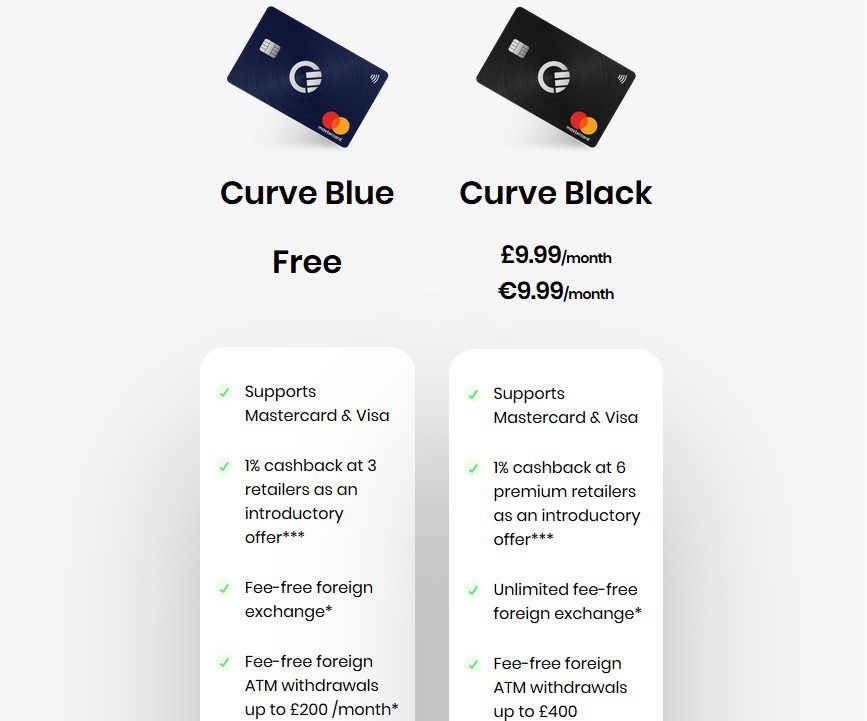
On the project’s website, download the app for your mobile phone; ordering the card happens entirely through this app. For them to actually send you the card, you have to add at least one of your payment cards to the app (they want to be sure you really intend to use their card). The card comes in two versions, Curve Blue and Curve Black. The Blue one is free:) Compared to Blue, the Black version has higher ATM withdrawal limits and offers, for example, travel insurance.
Adding and verifying your payment card
You add the card through the mobile app. You can only add VISA or MasterCard cards. To verify that the card is really yours, a small amount – on the order of cents, at most a few crowns – is charged. Then you have to look at your bank statement and enter into the app the code from this verification transaction. You’ll recognize this code, as well as all subsequent transactions made with the Curve card, by the CRV prefix. After verification, the charged amount is returned to your account.
So what’s it good for?
As I outlined in the intro, instead of all your cards you can carry just one in your wallet and use the app to switch which card the money is taken from. If you accidentally pay with a different card than you intended, you have up to 14 days to change your mind and pick a different card for the purchase. You see purchases immediately as a notification on your mobile phone. Through the app you have a perfect overview of all your payments across all your cards. You can photograph the receipt for a given purchase, so you have the proof safely stored for any complaints and the like.
Can’t find your card? You can lock it with a single tap through the app. Found it in your back pocket? Then unlock it again with a single tap. If you want to feel really safe, you can keep the card locked at all times and only unlock it right before paying.
And if you travel and pay by card abroad, you can save money too. The Curve card uses a wholesale exchange rate. That means you get a better rate than your bank would offer you. A payment abroad goes through in the foreign currency, Curve converts it to crowns, and charges that amount – already in crowns – to your card. I’ve tested that on a payment of 1 EUR I save 0.80 CZK compared to my regular card.
Since everything was completely free with no monthly fees at the time of writing, there was no reason not to give the card a chance.
Comments
No comments yet. Be the first.
I approve comments manually; yours will appear once approved.