
If you use a contact form on your website, you probably use (or will soon start looking for) some spam protection too. Google itself offers a good, non-intrusive one – reCAPTCHA v3. Easy integration is offered, for example, by the popular form builder plugin Contact Form 7. For users of the popular Divi theme and builder, the built-in form module offers reCAPTCHA v3 as well.
Setting up Google reCAPTCHA
To integrate the protection you need a SITE KEY and a SECRET KEY. You obtain these keys after registering your site with the Google reCAPTCHA service. For that you need a Google account. In the Admin console you then click the + (create) icon in the top right.

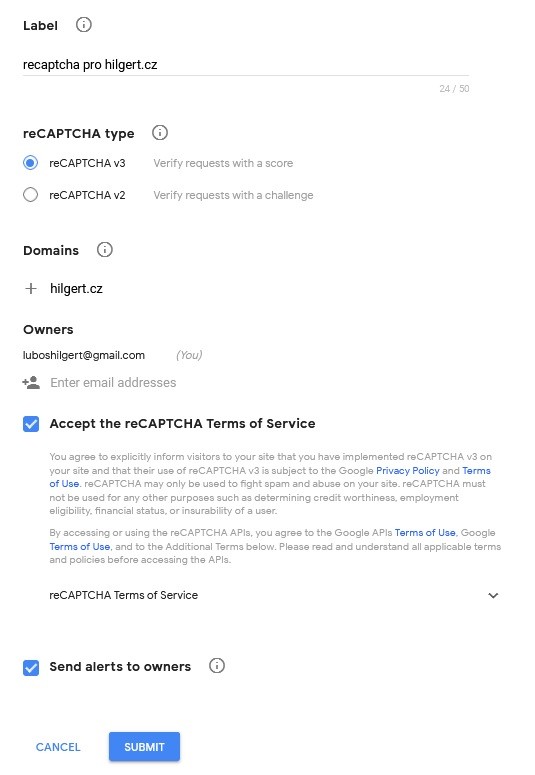
Then you fill in a form where, among other things, you enter all the domains on which reCAPTCHA should work.
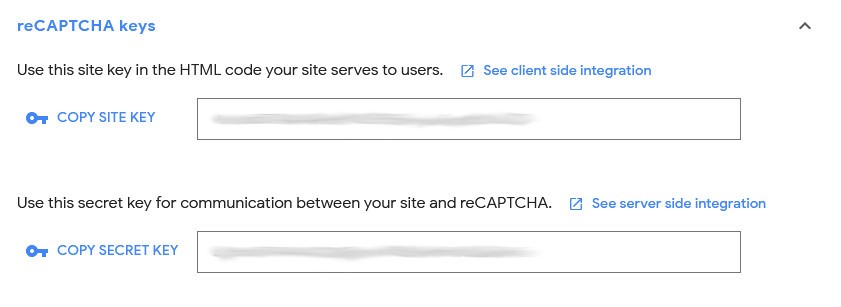
The service generates the keys mentioned. You can also display them for a given domain at any time by clicking the gear icon (Settings) and then reCAPTCHA keys.
After correct integration you should see the familiar badge on your site.

Careful, this can differ depending on the plugin used. While with Contact Form 7 the badge shows on every page, with DIVI it’s only on pages that contain a form. You can also hide the badge. However, you must then otherwise visibly inform users at the form that this service is being used (see the previous link).
Google reCAPTCHA and PageSpeed Insights
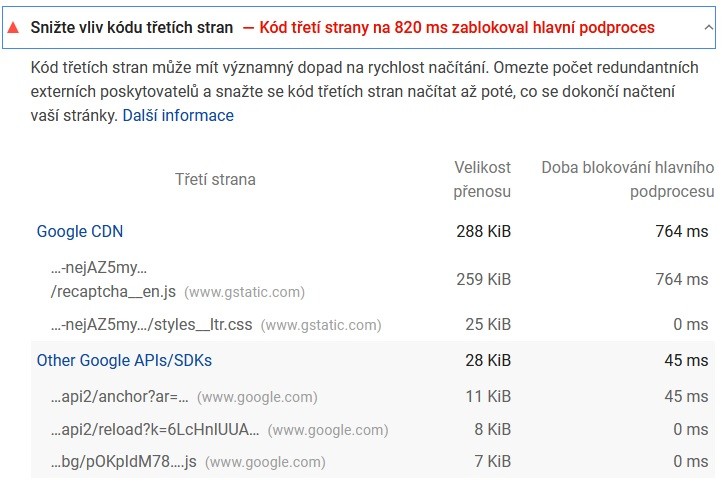
If you care about your site’s loading speed and use PageSpeed Insights to check it, you’ll find that your score dropped quite a bit after implementing Google reCAPTCHA. On top of that, the reCAPTCHA script loads on every one of your pages, not just the page with the form. Based on my testing I found that the score for mobile devices dropped by about 20 points and for desktop by about 10 points. The good news is that as a user you won’t notice the slowdown. According to my measurements I occasionally saw a difference in the Largest Contentful Paint metric, on the order of small tenths of a second. The score-drop issue is shown in the image below.
In the documentation you can read that, for reCAPTCHA to evaluate as accurately as possible whether on-site behavior is malicious or not, it should load everywhere. However, so far I’ve tested that it’s enough to load it on the page where reCAPTCHA is used. On top of that, this gets rid of the badge loading on all pages (unless you hide it, see above).
When I was thinking about how to solve this problem, I came across this guide, which worked perfectly for CF7. Into the functions.php of your active child theme you just need to write the following code.
add_action('wp_print_scripts', function () {
    global $post;
    if (is_a($post, 'WP_Post') && !has_shortcode($post->post_content, 'contact-form-7')) {
        wp_dequeue_script('google-recaptcha');
        wp_dequeue_script('wpcf7-recaptcha');
    }
});
The code goes through each of your pages and, if it doesn’t contain the CF7 shortcode, removes the reCAPTCHA scripts.
Unfortunately, I had no luck with Divi forms. Following this guide, which solves something similar, I did manage to remove the script loading on the desired Divi pages, but after some time the forms started failing when trying to submit. My code for Divi is below.
add_action( 'template_redirect', function(){
    global $post;
    if($post->ID != id_stranky_s_formularem && $post->ID != id_stranky_s_formularem2){
	remove_action( 'wp_enqueue_scripts', array( ET_Core_API_Spam_Providers::instance()->get( 'recaptcha', '' ), 'action_wp_enqueue_scripts' ) );
    }

});
If anyone finds a working solution for Divi, let me know – I’ll be happy to take a look.